跳到商品資訊
Portable Dual Screen Monitor for Laptop - Enhance Productivity on the Go - RFE Marketing Ventures

便攜式雙螢幕筆記型電腦顯示器 - 提高旅途中的工作效率

促銷價  $329.99 定價  $349.99
類型

使用手提式雙螢幕顯示器增強您的工作流程

在當今快節奏的數位時代,保持高效移動從未如此重要。這款可攜式雙螢幕筆記型電腦顯示器,無論您身在何處,都能提升您的工作效率。無論您是常旅客、數位遊民,還是喜歡在多個地點辦公,這款創新設備都能幫助您擴展螢幕空間,簡化工作流程。

想像一下,擁有像專業人士一樣進行多任務處理、無縫共享簡報或輕鬆深入細緻的專案。有了隨身雙螢幕顯示器,提升效率的可能性無窮無盡。這款超棒的配件將您的單螢幕筆記型電腦轉變為動態雙螢幕顯示設備,讓您能夠更清晰、更有序地處理任務。

便攜式雙螢幕顯示器的主要特點

  • 小巧輕巧的設計:雙螢幕顯示器設計方便攜帶,可輕鬆放入您的筆記型電腦包中,確保您可以輕鬆隨身攜帶。
  • 無縫設定:即插即用功能可在大多數筆記型電腦上快速輕鬆地安裝,從而節省您寶貴的時間。
  • 高畫質顯示:透過清晰的圖形享受令人驚嘆的視覺效果,使每個細節都清晰可見,同時增強您的整體觀看體驗。
  • 相容於多種裝置:此顯示器不僅相容於筆記型電腦,還可與各種作業系統和裝置搭配使用,滿足您的所有需求。

提高你的生產力

使用便攜式雙螢幕顯示器可以讓工作空間更加井然有序。您可以在一個螢幕上開啟電子郵件,同時在另一個螢幕上處理文件。這種並排顯示模式提供了更廣泛的信息,並有助於避免單顯示器使用者經常遇到的來回切換任務的情況。透過優化工作視圖,您可以顯著減少查找資訊或在程式之間切換的時間。

非常適合遠距工作和旅行

隨著遠距辦公日益普及,擁有合適的工具對於保持高效工作至關重要。便攜式雙螢幕顯示器是遠距辦公人士、學生以及任何需要靈活辦公的人士的理想選擇。您可以在咖啡館、共享辦公空間,甚至在家中輕鬆設置雙屏,確保您在任何地點都能高效工作。

增強協作與共享

正在與客戶或團隊成員開會?隨身雙螢幕顯示器讓您輕鬆分享工作成果。無論您是簡報設計、瀏覽報告或展示項目,更大的螢幕空間都能帶來更佳的協作體驗。您可以邀請其他人查看您的螢幕,同時仍保留一個單獨的區域用於記錄個人筆記或正在進行的任務。

保持通勤效率

雙顯示器配置不僅適用於辦公室。搭火車或公車上下班?便攜式雙螢幕顯示器帶來的增強功能,讓您能夠繼續高效工作,不再受限於筆記型電腦的小螢幕。專案截止日期迫在眉睫?不妨利用通勤途中的空閒時間來優化您的工作效率。

極致多功能性

儘管設計緊湊,這款便攜式雙螢幕顯示器的功能卻絲毫不遜色。它支援多種螢幕方向,您可以根據個人喜好傾斜或旋轉螢幕。此外,它還配備 USB 和 HDMI 接口,可輕鬆連接到筆記型電腦並將其切換至雙螢幕模式,從而在各種工作場景中提供更強大的功能。

易於維護和保養

便攜式雙螢幕顯示器的保養非常簡單。它擁有耐用的外殼和保護螢幕,維護成本極低。只需定期用超細纖維布清潔,即可保持螢幕無污漬,煥然一新。此外,節能設計確保更低的功耗,既省錢又方便。

保證客戶滿意

我們以提供滿足客戶需求的頂級優質產品而自豪。我們的便攜式雙螢幕顯示器在設計時始終以使用者體驗為先,為那些追求多功能性和高效工作流程的使用者提供可靠的解決方案。為您的筆記型電腦選擇我們的便攜式雙螢幕解決方案,加入無數滿意用戶的行列。

立即訂購!

不要錯過提升生產力、革新行動辦公方式的機會。立即體驗便攜式雙螢幕顯示器帶來的革命性優勢。立即訂購,簡化您的任務,提升效率,並在每次打開筆記型電腦時最大限度地發揮您的潛力!點擊下方按鈕,立即開始,革新您的工作體驗!

您可能也喜歡

  • 5 stars: 11 (55%)
  • 4 stars: 4 (20%)
  • 3 stars: 2 (10%)
  • 2 stars: 2 (10%)
  • 1 star: 1 (5%)
J
JohNico
Perfect Travel Monitor

This is the perfect travel monitor and versatile. Instead of securing it permanently to my laptop, I chose to keep it freestanding so I can move it around and use it in my home office or while traveling. It's the perfect size, light and is a simple connection to my laptop with one cord. I love it!
V
V. Billit
Please help

I don’t know what to do but I feel like the brightness is very low compared to my MacBook. Is this for everyone or is mine slightly not working? And yes it is at full brightness
K
Kimberly Dodd
Perfect size and attached easily!

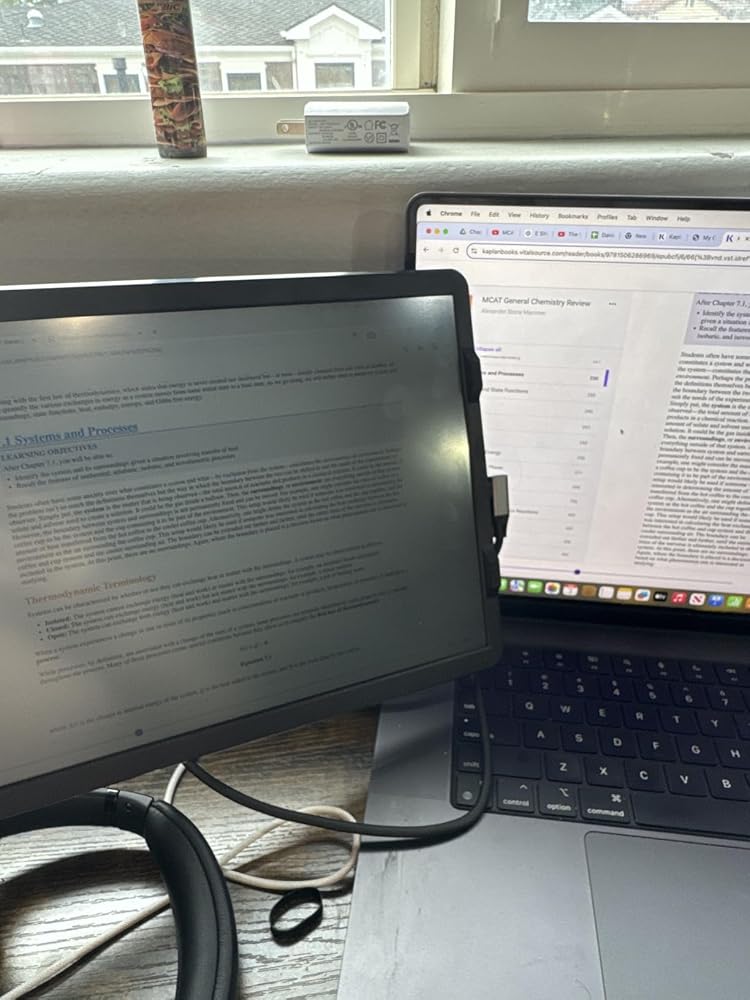
Easy to install and picture is clear! Flip screen for when I do presentation and have conference meetings for the others to see the shared screen! Also works to set it beside the computer on a stand for conferences as well! Ease of duplicate screen for viewing multiple documents!

S
Sarah B
Great experience!

Much needed! It’s portable and easy to bring to a coffee shop to work. It’s also great for at home, the extra screen helps tremendously and it’s also easy to take off and store. Only draw back is that I got a new computer and having trouble taking the plate off of the old one to switch over.

S
Stacey K Roseberry
Folding Laptop screen extender.

This is absolutely the best work related product I've ever purchased!!! It has made using my laptop much easier. It installed easily with the instructuon card that came in the package. I can't begin to say how much more efficient my time on the laptop is now.Many of my business colleagues have now purchased one for themselves after viewing mine.

S
Sam C
Great 2nd monitor screen for a laptop

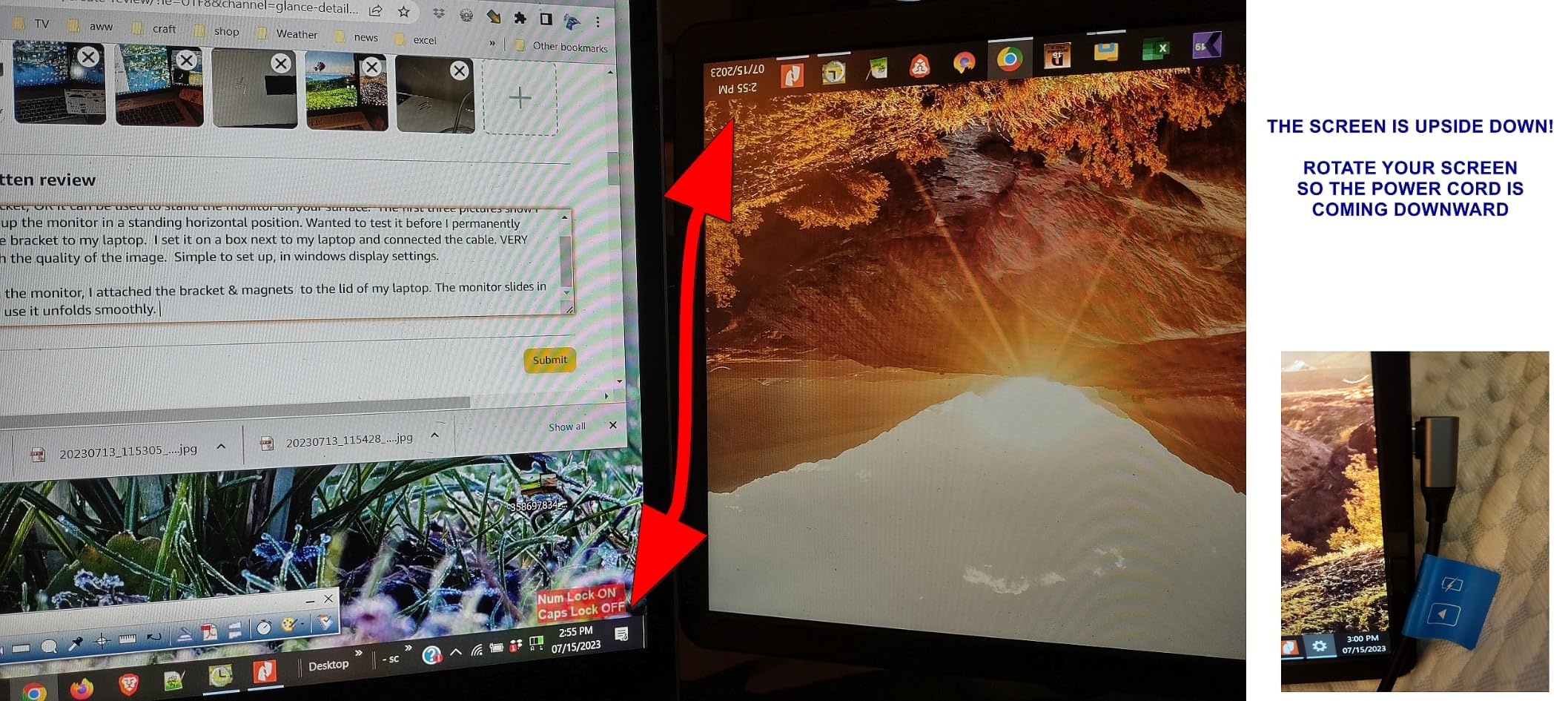
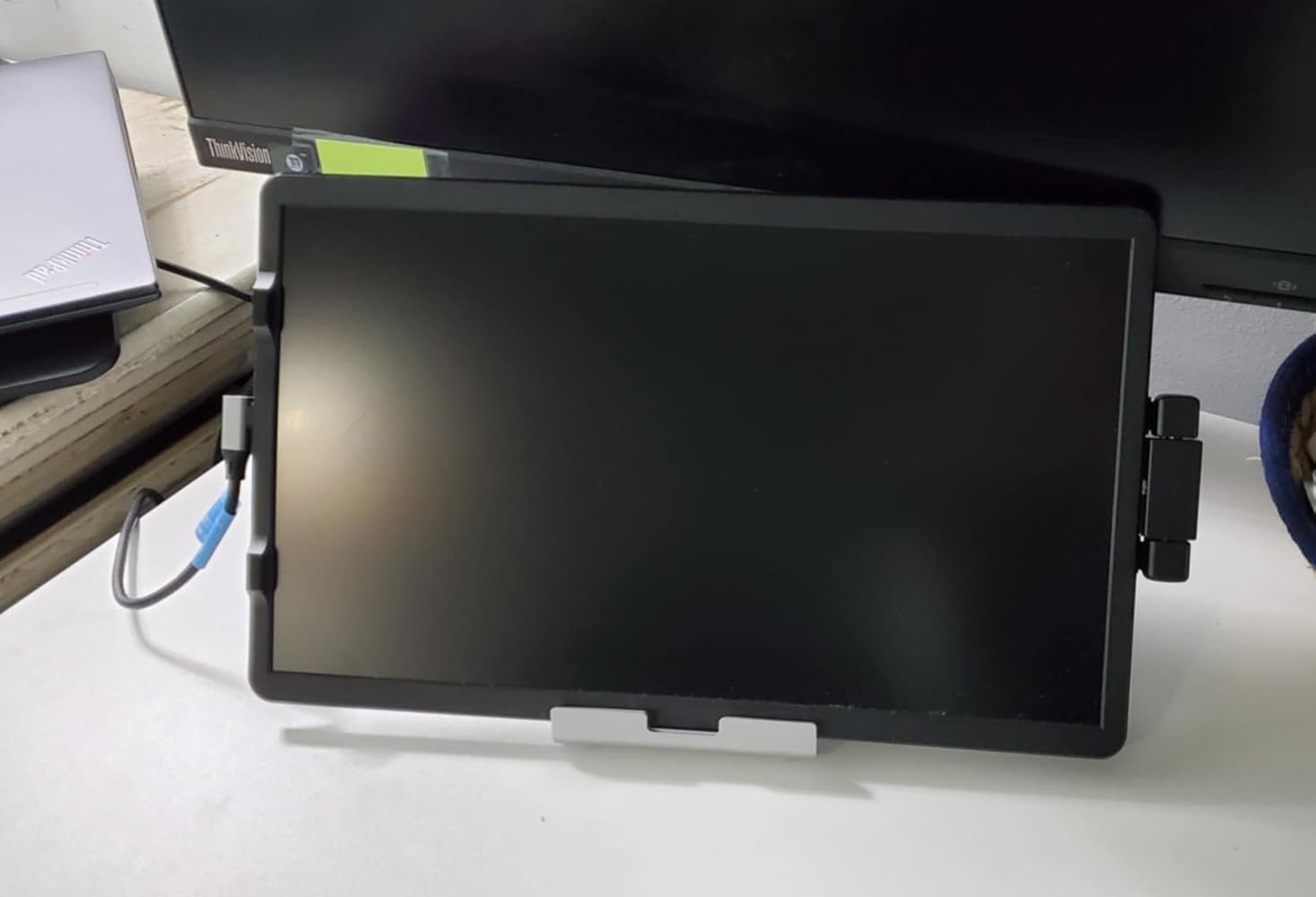
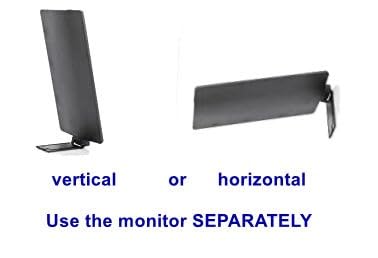
LOVE THIS and HIGHLY RECOMMEND IT. SO GLAD I caught it on sale!I waited a month before reviewing it to get good use from it before commenting.At first, I tried the monitor as a stand alone piece. The L shaped piece on the back of the monitor slides into the bracket, OR it can be used to stand the monitor on your surface. The first three pictures show I was setting up the monitor in a standing horizontal position. Wanted to test it before I permanently attached the bracket to my laptop. I set it on a box next to my laptop and connected the cable. VERY pleased with the quality of the image. Simple to set up, in windows display settings.After trying the monitor, I attached the bracket & magnets to the lid of my laptop. The monitor slides in easy and to use it unfolds smoothly. I placed my bracket a 1/8 too far in on my laptop so when I want to TILT my Farfi screen, I simply pull the monitor out a bit (the bracket is still supporting well). Having the second screen is a relief.PROS:- Easy install, and even after install, easy to use as stand alone monitor if needed- lightweight but is very sturdy- clean crisp 1080p image.- easy to adjust windows display settings. Either show same as primary screen, Extend the screen (more space) or IGNORE the 2nd monitor if you don't want to use it for some reason.- bracket is strong, adhesive easy to apply, template was well designed and versatile (left or right use)- multiple choice of cables/connections.- Farfi offers another bracket & adhesive (separate purchase) so the device can be moved to a different laptopCONS:- Image is bright enough. Wish it was just a tad brighter- the USB-C cable is LONG. A bit too long. but at least there is no tension on the port.NOTE: The last picture I posted is a PROBLEM and a FIX.IF your second screen (the Farfi) is showing content upside down, ROTATE THE SCREEN.Make sure the cable is coming DOWNWARDS from the screen.While writing this review I mistakenly had the power going UP causing the problem. I did a rotation and problem solved. (I don't remove the cable from the monitor. I unplug from the laptop only)
E
Erika
Didn’t Work For Me

My laptop couldn’t connect with this monitor- it just wouldn’t pick up on it. Never got it to work. Also, it’s just about impossible to remove that sticky backing that attaches the monitor to the laptop. I ended up cutting my finger trying to get it off.

p
paul alexander
Didn’t last long enough.

It worked great for about 10 months but now screen flickers and constantly shuts down and starts backup. Has gotten worse to point it can’t be used. Too expensive to not last.

N
Nebrido Nocon
Increase your productivity!!!

I've had the add on screen for roughly 5 months and its really helped with my productivity by having a second screen. Great picture and holds in position well. Would highly recommend product! I direct all of my co-workers to this product!

T
TplusN4
Laptop essential

This is an essential for working on large data blocks requiring multiple open windows at once.

K
KIMBERLYBUSS
Great Product

love this product would be lost without it. Use it when I'm not at home at my desk, need double screens

J
Joe
Versatile

Good option for on the good folks who need an extra screen to demonstrate or share information to others instead of having them over your shoulder or close next to you. Works great as a second screen too!

G
Gor
Effective monitor

A coworker recommended this monitor and I couldn’t be happier with this purchase to accomplish work while traveling and delivering presentations in offices while on the road.

D
DJ
Only wish I bought it sooner!

I love this product and I regret not having purchased it earlier.Cons:-I gave it 4 stars instead of 5 because it's outrageously expensive for what it is.-The usb-c cable that comes with it is too long-I ended up buying another cable that is the perfect length and stays out of the way.-The screen brightness is slightly lower than my laptop but that doesn't bother me much.-Its hard to find replacement parts for mounting it (bracket and magnets). I ordered something odd eBay that will hopefully work. Otherwise I am going to be stuck trying to use command strips to reapply the mounting plate to a different laptop in a few weeks.Pros:-I love being able to work from anywhere without losing the ability to be productive. This makes it so much easier for me to travel and still work productively. I'm not tied to my desk if I need more screen real estate.-Since this product rotates, it can be set up on either side of your laptop to align with where your usb-c port is.-It's not so heavy that it pulls down the laptop screen.-I've showed it to a few friends who are all raving about it and have asked for the link to buy one. (Although I recommend waiting for either a prime day or black Friday sale-this product is not worth $160.)I tried out 3 or 4 different laptop monitor extenders and this was by far the best option. I tried one with two screens but that was way too heavy for my laptop to handle, and pulled the screen down. I like to be able to work from ANYWHERE (including the couch) so having a monitor that didn't need its weight supported on a table was important to me.One thing to note-when storing this, I put a piece of felt between the extender and the laptop. I don't want the screen to get scratched up by its own mounting bracket. It would be nice if this came with some sort of storage protection.

M
Ministerio Echando El Pan Sobre Las Aguas Inc.
Is good but

connection is good but the cables, is anoying.unce you glue it. That's it, can't remove it. the screen is not as light it is heavier then it pulls the lap tap back.

R
Rich Campbell
Great 2nd monitor

Didn't realize what I was missing by not having a 2nd monitor. Now cant work without it. Like that it becomes part of my laptop and no need to detach. The adhesive strips that holds the plate to the laptop cover gave way, because of the weight, after a couple of days but very minor issue so still a 5 star review. Purchased stronger adhesive and holds great now.

A
Amazon Customer
Perfect for presentations and working on the go

Love having an additional screen for my laptop, really helps when presenting and when working on the go. the only issue I have is the brightness. It is dim, but not so much it makes it unreadable. overall a good product for the price ($159)

A
Adam
Screen works great when it stays connected

I've only used it for about 3 months but the cable that connects the screen to the computer started malfunctioning almost immediately. I ignored it--shouldn't have, since the support window has closed. The screen has worked great for me about 90% of the time. The 10% that it doesn't is crippling--all of a sudden I can't do my job like I'm used to doing, and it comes down to the cord not having a good connection. I believe it would probably work perfectly if the cord were replaced and I'm going to have to soon, it's been limping along but the kill in productivity when the screen cuts out is too high.

A
A. Gerry
Great additional screen when traveling

Having a second screen on the go has been super helpful! I work with 2 large external monitors plus the laptop monitor daily so when I only have a laptop to work off of I struggle. It does make the laptop a little heavy and if not propped in a good position (like if I have the laptop placed in my lap while working) it does tend to make the whole laptop tip backwards. Not worth taking a star away though! Images, font, brightness all are better than I expected. Again I don't use it for everyday work needs but certain help productivity when not working in my office. I am satisfied with my purchase and would recommend.

A
Abby
Did Not Work for Me

My colleague had one of these installed on her laptop. I bought this but it did not work for me.1. You have to stick a "base" onto your laptop first. The base is about the size of a credit card. The laptop screen extender has a piece that slides into the base. It took me a really long time to find the base. It was attached to the laptop screen extender and I could not understand how to detach it from the laptop screen extender. This screen extender comes with pretty good instructions on how to apply the base, but it did not give any helpful information about how to detach the base from the laptop screen extender. I finally gave this to a friend and he figured out how to slide the base out from the laptop screen extender. This was a huge frustration point for me.2. After you get the base detached from the laptop extender, you have to figure out where you want to stick the base on your laptop and whether you want the top of the laptop extender to line up with the top of your laptop or to place it in the middle. If you want the laptop screen extender to sit in the middle of your laptop, the manufacturer provides a paper ruler to help ensure that you place the base in the center of your laptop. The manufacturer provides helpful instructions on how to stick the base onto your laptop.Once you get the base stuck on, you can slide the laptop screen extender into the base. This added some weight and thickness to my laptop but I was okay with it.3. The manufacturer provides you with three cables. If you only want to use one cable for both video and power then your laptop must have a USB-C 3.1 port or higher. If your laptop does not have a USB-C port, then you have to use the HDMI cable to transmit video and the USB-A cable (black cable) for power.      My laptop has a USB-C port so I tried to use the single cable. I connected the cable and pressed the "On" button on the side of the laptop extender. The words, "farfi" would appear on the screen and then the screen would turn black/turn off. I was unable to get past this step and get the screen to display my computer.Pros: I asked the seller for help with questions and the seller responded very quickly and also included pictures/video. I found that the pictures and video were incredibly helpful. I am not extremely technical and do not usually assemble things, so the pictures helped me skip any confusing explanations and showed me exactly what I needed to do. There are no YouTube videos available which show how to attach everything to your laptop and power it on.When I decided that this product was not working for me, I needed to remove the base from my laptop screen. The manufacturer includes a small squeegee. I dipped the squeegee into some water diluted with Dawn soap and slowly lifted the base from my laptop cover. The adhesive was strong, but using Dawn soap to lift up the adhesive worked great. Just be patient and trust that the detergent will loosen up the adhesive. The manufacturer's instructions give the tip about using a detergent to loosen the adhesive and I really appreciated that info.

  • 5 stars: 11 (55%)
  • 4 stars: 4 (20%)
  • 3 stars: 2 (10%)
  • 2 stars: 2 (10%)
  • 1 star: 1 (5%)
J
JohNico
Perfect Travel Monitor

This is the perfect travel monitor and versatile. Instead of securing it permanently to my laptop, I chose to keep it freestanding so I can move it around and use it in my home office or while traveling. It's the perfect size, light and is a simple connection to my laptop with one cord. I love it!

V
V. Billit
Please help

I don’t know what to do but I feel like the brightness is very low compared to my MacBook. Is this for everyone or is mine slightly not working? And yes it is at full brightness

K
Kimberly Dodd
Perfect size and attached easily!

Easy to install and picture is clear! Flip screen for when I do presentation and have conference meetings for the others to see the shared screen! Also works to set it beside the computer on a stand for conferences as well! Ease of duplicate screen for viewing multiple documents!

S
Sarah B
Great experience!

Much needed! It’s portable and easy to bring to a coffee shop to work. It’s also great for at home, the extra screen helps tremendously and it’s also easy to take off and store. Only draw back is that I got a new computer and having trouble taking the plate off of the old one to switch over.

S
Stacey K Roseberry
Folding Laptop screen extender.

This is absolutely the best work related product I've ever purchased!!! It has made using my laptop much easier. It installed easily with the instructuon card that came in the package. I can't begin to say how much more efficient my time on the laptop is now.Many of my business colleagues have now purchased one for themselves after viewing mine.

S
Sam C
Great 2nd monitor screen for a laptop

LOVE THIS and HIGHLY RECOMMEND IT. SO GLAD I caught it on sale!I waited a month before reviewing it to get good use from it before commenting.At first, I tried the monitor as a stand alone piece. The L shaped piece on the back of the monitor slides into the bracket, OR it can be used to stand the monitor on your surface. The first three pictures show I was setting up the monitor in a standing horizontal position. Wanted to test it before I permanently attached the bracket to my laptop. I set it on a box next to my laptop and connected the cable. VERY pleased with the quality of the image. Simple to set up, in windows display settings.After trying the monitor, I attached the bracket & magnets to the lid of my laptop. The monitor slides in easy and to use it unfolds smoothly. I placed my bracket a 1/8 too far in on my laptop so when I want to TILT my Farfi screen, I simply pull the monitor out a bit (the bracket is still supporting well). Having the second screen is a relief.PROS:- Easy install, and even after install, easy to use as stand alone monitor if needed- lightweight but is very sturdy- clean crisp 1080p image.- easy to adjust windows display settings. Either show same as primary screen, Extend the screen (more space) or IGNORE the 2nd monitor if you don't want to use it for some reason.- bracket is strong, adhesive easy to apply, template was well designed and versatile (left or right use)- multiple choice of cables/connections.- Farfi offers another bracket & adhesive (separate purchase) so the device can be moved to a different laptopCONS:- Image is bright enough. Wish it was just a tad brighter- the USB-C cable is LONG. A bit too long. but at least there is no tension on the port.NOTE: The last picture I posted is a PROBLEM and a FIX.IF your second screen (the Farfi) is showing content upside down, ROTATE THE SCREEN.Make sure the cable is coming DOWNWARDS from the screen.While writing this review I mistakenly had the power going UP causing the problem. I did a rotation and problem solved. (I don't remove the cable from the monitor. I unplug from the laptop only)

E
Erika
Didn’t Work For Me

My laptop couldn’t connect with this monitor- it just wouldn’t pick up on it. Never got it to work. Also, it’s just about impossible to remove that sticky backing that attaches the monitor to the laptop. I ended up cutting my finger trying to get it off.

p
paul alexander
Didn’t last long enough.

It worked great for about 10 months but now screen flickers and constantly shuts down and starts backup. Has gotten worse to point it can’t be used. Too expensive to not last.

N
Nebrido Nocon
Increase your productivity!!!

I've had the add on screen for roughly 5 months and its really helped with my productivity by having a second screen. Great picture and holds in position well. Would highly recommend product! I direct all of my co-workers to this product!

T
TplusN4
Laptop essential

This is an essential for working on large data blocks requiring multiple open windows at once.

K
KIMBERLYBUSS
Great Product

love this product would be lost without it. Use it when I'm not at home at my desk, need double screens

J
Joe
Versatile

Good option for on the good folks who need an extra screen to demonstrate or share information to others instead of having them over your shoulder or close next to you. Works great as a second screen too!

G
Gor
Effective monitor

A coworker recommended this monitor and I couldn’t be happier with this purchase to accomplish work while traveling and delivering presentations in offices while on the road.

D
DJ
Only wish I bought it sooner!

I love this product and I regret not having purchased it earlier.Cons:-I gave it 4 stars instead of 5 because it's outrageously expensive for what it is.-The usb-c cable that comes with it is too long-I ended up buying another cable that is the perfect length and stays out of the way.-The screen brightness is slightly lower than my laptop but that doesn't bother me much.-Its hard to find replacement parts for mounting it (bracket and magnets). I ordered something odd eBay that will hopefully work. Otherwise I am going to be stuck trying to use command strips to reapply the mounting plate to a different laptop in a few weeks.Pros:-I love being able to work from anywhere without losing the ability to be productive. This makes it so much easier for me to travel and still work productively. I'm not tied to my desk if I need more screen real estate.-Since this product rotates, it can be set up on either side of your laptop to align with where your usb-c port is.-It's not so heavy that it pulls down the laptop screen.-I've showed it to a few friends who are all raving about it and have asked for the link to buy one. (Although I recommend waiting for either a prime day or black Friday sale-this product is not worth $160.)I tried out 3 or 4 different laptop monitor extenders and this was by far the best option. I tried one with two screens but that was way too heavy for my laptop to handle, and pulled the screen down. I like to be able to work from ANYWHERE (including the couch) so having a monitor that didn't need its weight supported on a table was important to me.One thing to note-when storing this, I put a piece of felt between the extender and the laptop. I don't want the screen to get scratched up by its own mounting bracket. It would be nice if this came with some sort of storage protection.

M
Ministerio Echando El Pan Sobre Las Aguas Inc.
Is good but

connection is good but the cables, is anoying.unce you glue it. That's it, can't remove it. the screen is not as light it is heavier then it pulls the lap tap back.

R
Rich Campbell
Great 2nd monitor

Didn't realize what I was missing by not having a 2nd monitor. Now cant work without it. Like that it becomes part of my laptop and no need to detach. The adhesive strips that holds the plate to the laptop cover gave way, because of the weight, after a couple of days but very minor issue so still a 5 star review. Purchased stronger adhesive and holds great now.

A
Amazon Customer
Perfect for presentations and working on the go

Love having an additional screen for my laptop, really helps when presenting and when working on the go. the only issue I have is the brightness. It is dim, but not so much it makes it unreadable. overall a good product for the price ($159)

A
Adam
Screen works great when it stays connected

I've only used it for about 3 months but the cable that connects the screen to the computer started malfunctioning almost immediately. I ignored it--shouldn't have, since the support window has closed. The screen has worked great for me about 90% of the time. The 10% that it doesn't is crippling--all of a sudden I can't do my job like I'm used to doing, and it comes down to the cord not having a good connection. I believe it would probably work perfectly if the cord were replaced and I'm going to have to soon, it's been limping along but the kill in productivity when the screen cuts out is too high.

A
A. Gerry
Great additional screen when traveling

Having a second screen on the go has been super helpful! I work with 2 large external monitors plus the laptop monitor daily so when I only have a laptop to work off of I struggle. It does make the laptop a little heavy and if not propped in a good position (like if I have the laptop placed in my lap while working) it does tend to make the whole laptop tip backwards. Not worth taking a star away though! Images, font, brightness all are better than I expected. Again I don't use it for everyday work needs but certain help productivity when not working in my office. I am satisfied with my purchase and would recommend.

A
Abby
Did Not Work for Me

My colleague had one of these installed on her laptop. I bought this but it did not work for me.1. You have to stick a "base" onto your laptop first. The base is about the size of a credit card. The laptop screen extender has a piece that slides into the base. It took me a really long time to find the base. It was attached to the laptop screen extender and I could not understand how to detach it from the laptop screen extender. This screen extender comes with pretty good instructions on how to apply the base, but it did not give any helpful information about how to detach the base from the laptop screen extender. I finally gave this to a friend and he figured out how to slide the base out from the laptop screen extender. This was a huge frustration point for me.2. After you get the base detached from the laptop extender, you have to figure out where you want to stick the base on your laptop and whether you want the top of the laptop extender to line up with the top of your laptop or to place it in the middle. If you want the laptop screen extender to sit in the middle of your laptop, the manufacturer provides a paper ruler to help ensure that you place the base in the center of your laptop. The manufacturer provides helpful instructions on how to stick the base onto your laptop.Once you get the base stuck on, you can slide the laptop screen extender into the base. This added some weight and thickness to my laptop but I was okay with it.3. The manufacturer provides you with three cables. If you only want to use one cable for both video and power then your laptop must have a USB-C 3.1 port or higher. If your laptop does not have a USB-C port, then you have to use the HDMI cable to transmit video and the USB-A cable (black cable) for power.      My laptop has a USB-C port so I tried to use the single cable. I connected the cable and pressed the "On" button on the side of the laptop extender. The words, "farfi" would appear on the screen and then the screen would turn black/turn off. I was unable to get past this step and get the screen to display my computer.Pros: I asked the seller for help with questions and the seller responded very quickly and also included pictures/video. I found that the pictures and video were incredibly helpful. I am not extremely technical and do not usually assemble things, so the pictures helped me skip any confusing explanations and showed me exactly what I needed to do. There are no YouTube videos available which show how to attach everything to your laptop and power it on.When I decided that this product was not working for me, I needed to remove the base from my laptop screen. The manufacturer includes a small squeegee. I dipped the squeegee into some water diluted with Dawn soap and slowly lifted the base from my laptop cover. The adhesive was strong, but using Dawn soap to lift up the adhesive worked great. Just be patient and trust that the detergent will loosen up the adhesive. The manufacturer's instructions give the tip about using a detergent to loosen the adhesive and I really appreciated that info.